 +
+

ERPNext + atoship
Ship your ERPNext Sales Orders without leaving ERPNext. Compare live rates from all major carriers, buy labels one at a time or in bulk, and write tracking straight back onto the order.
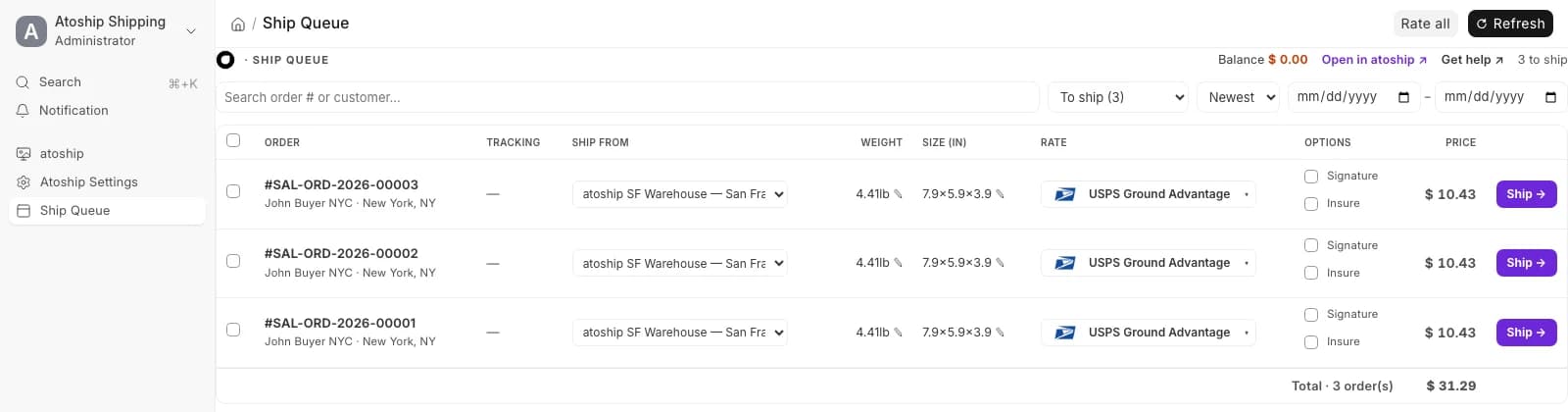
The Ship Queue — ship every order from one table, without leaving ERPNext.
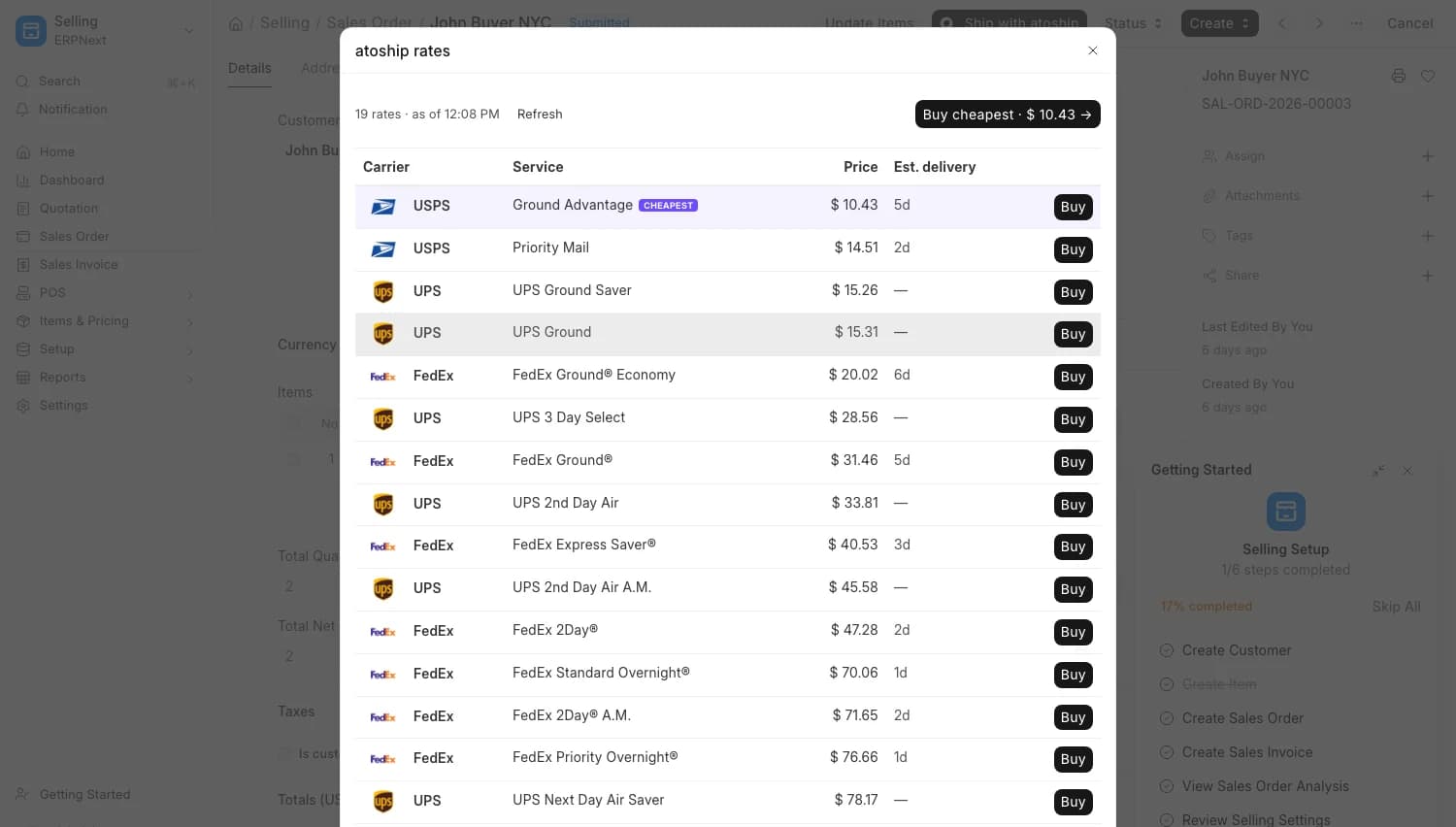
Live rates on any Sales Order — compare and buy, right in the form.
How it works
From bench install to first label in under 10 minutes
Install the app
atoship is a self-hosted Frappe app installed straight from GitHub — no OAuth handshake, no marketplace. SSH into your bench and run three commands.
$bench get-app https://github.com/atoship/atoship-for-erpnext$bench --site your-site install-app atoship_shipping$bench --site your-site migrateAdd your API key
In ERPNext open Atoship Settings, paste your atoship API key (ak_live_… , or ak_test_… to dry-run), and click Test Connection to confirm the link.
Set your defaults
Choose a Ship-From Address, a default box and weight, and your preferred label format. That is the whole setup — you are ready to ship.
Rate, buy, and track
Open any submitted Sales Order, click Ship with atoship, compare live rates from all major carriers, and buy a label. The tracking number writes straight back onto the order.
Everything you need to ship from ERPNext
A complete fulfillment workflow, built into your existing ERPNext install
Multi-carrier rate comparison
See live rates from all major carriers side by side on every Sales Order. Pick the cheapest or fastest option in one click.
One-click and bulk label buy
Buy a label from a single Sales Order, or select many from the list or the Ship Queue and buy them all from a sticky bulk bar.
Tracking writeback
Every label's carrier and tracking number write back onto the Sales Order automatically, ready for your customer notifications.
Signature and insurance
Toggle signature confirmation and shipment insurance per order before you buy — no separate carrier portal, no extra steps.
Void and refund
Cancel a shipped label right from the row. atoship voids it with the carrier and refunds your wallet.
Discounted rates, no monthly fee
Ship at atoship's discounted carrier rates and pay from your wallet. No per-label subscription and no monthly platform fee.
Manual shipping vs. atoship
See how much time you save on every Sales Order
| Task | Manual process | With atoship |
|---|---|---|
| Rate shopping | Open each carrier website | All major carriers in one view |
| Label creation | Retype the address on a carrier site | One click from the Sales Order |
| Tracking updates | Paste the number back onto the order | Written back automatically |
| Batch shipping | One order at a time | Select all, buy all from the Ship Queue |
| Signature & insurance | Log into a separate carrier portal | Toggle per order before you buy |
| Cancelling a label | Chase a refund by email | Void + wallet refund in one click |
Three places to ship inside ERPNext
Every surface reads live rates from atoship and writes tracking back onto the order
Sales Order form
A Ship with atoship button on every submitted order. Fetch live rates, pick one, and buy — then Print Label, Update Tracking, or Track Package. Rates are cached, so reopening the order is instant.
Sales Order list
Select any set of orders and choose Actions → Ship with atoship to bulk-buy labels, or hit Open Ship Queue to jump straight into the full fulfillment workbench.
Ship Queue
A native page at /app/atoship-ship: every unshipped order in one table with per-row ship-from, editable weight and size, an auto-fetched rate you can switch, signature + insurance toggles, and one-click Ship. Select many and buy them all from the sticky bulk bar. Shipped rows show tracking, Print, and Cancel.
Frequently asked questions
Which ERPNext versions are supported?
The app targets ERPNext v15 and newer, self-hosted or on Frappe Cloud. It is built on the Frappe framework and installs as a standard Frappe app, so it lives right alongside your existing ERPNext modules.
How do I install it?
It is a self-hosted Frappe app installed over git — not an OAuth or marketplace connect flow. From your bench run: bench get-app https://github.com/atoship/atoship-for-erpnext, then bench --site your-site install-app atoship_shipping, then bench --site your-site migrate. Finally add your atoship API key in Atoship Settings.
Do I need to connect a store or grant OAuth access?
No. There is no OAuth handshake and no webhook callback URL to expose. atoship talks to your ERPNext through the installed app — you only paste your atoship API key and set a Ship-From Address.
Which carriers can I use?
All major carriers. atoship is a thin client: all rating, carrier routing, and label generation run on atoship's v1 API, and only real, name-brand carriers are ever shown — never backend aggregators. It is parcel shipping only — freight and LTL are out of scope.
Is the app free?
The app is open source (MIT) and free to install — no license and no per-label monthly fee. You pay the discounted carrier rate for each label from your funded atoship wallet, and tracking is included.
Can I test before spending money?
Yes. Use an ak_test_… API key to dry-run the rate and label flow without buying real postage, then switch Atoship Settings to your ak_live_… key when you are ready to ship for real.
Start shipping from ERPNext today
Install the free app, add your API key, and print your first label in minutes.