 +
+

Odoo + atoship
Odoo can book a carrier. It cannot work a shipping desk. This module adds the page that was missing — price a whole day's deliveries against USPS, FedEx, UPS and DHL, and buy the labels from one screen.
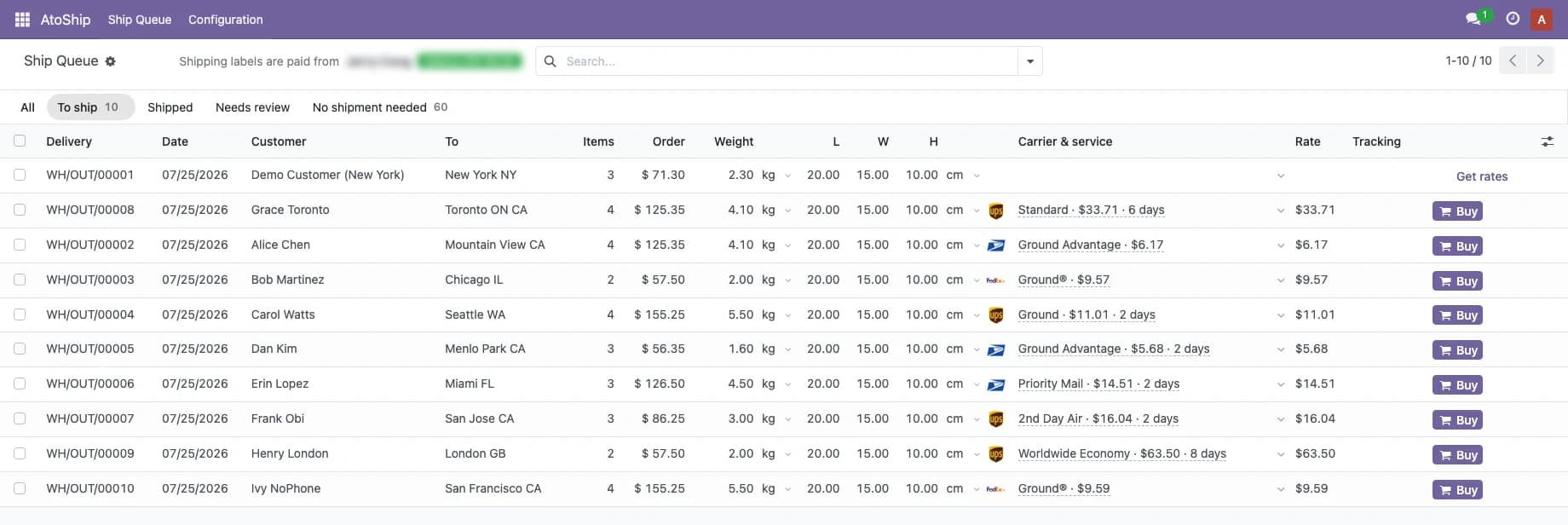
The Ship Queue — one row per delivery, with the price and the Buy button on it.
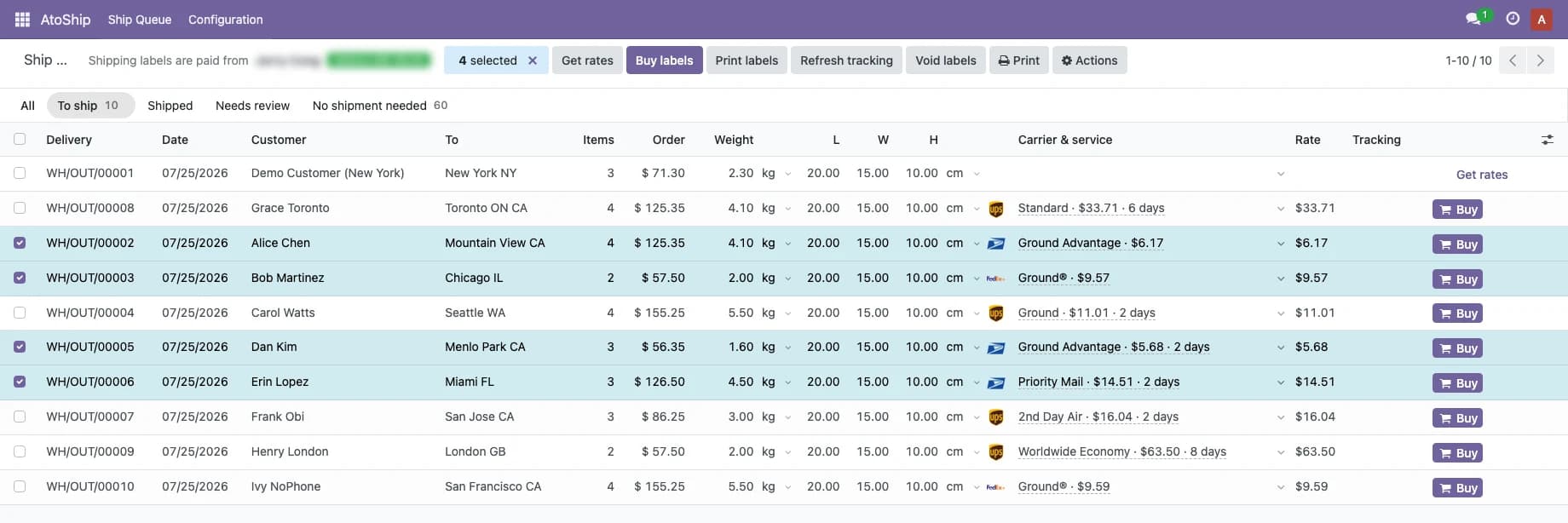
Tick any number of rows — rate, buy, print, track or void them together.
How it works
From git clone to first label in under 10 minutes
Clone the branch that matches your Odoo
atoship is a self-hosted Odoo module installed from GitHub — no marketplace purchase, no license key. The repository IS an addons directory, so clone it and point Odoo at it.
$git clone -b 19.0 https://github.com/atoship/atoship-for-odoo.git /opt/atoship-addons$# then add /opt/atoship-addons to addons_path and restart OdooInstall the module
In Odoo go to Apps → Update Apps List → search AtoShip → Install. An AtoShip delivery method is created for you on install.
Connect your account
AtoShip → Configuration → Connection → Connect to AtoShip. Approve on atoship.com and you are redirected back. OAuth 2.0 with PKCE — there are no API keys to copy, and tokens refresh themselves.
Work the Ship Queue
Open AtoShip → Ship Queue. Price the whole page in one click, pick a carrier and service per row, and buy — one at a time, or tick the page and buy them together.
Everything you need to ship from Odoo
A complete shipping desk, built into your existing Odoo install
Every rate, in the row
Each delivery carries the carrier's own mark, the service, the price and the transit time — plus a dropdown of every other rate quoted for it. Choosing on price alone is how a seller buys 7-day ground for a next-day promise.
Buy one, or buy the page
A Buy button sits in every row beside the price it will charge. Tick any number of rows and rate them, buy them, print them, refresh their tracking or void them together.
Weigh and box in place
Type the weight straight into the row, in whatever unit the scale in front of you reads — kg, g, lb, oz, cm, in — switched from the row itself. Tick several rows and one edit re-weighs, re-boxes or re-origins all of them.
The wallet, before you buy
Your balance sits beside the page title, because it is the number that has to be read before pressing Buy rather than after a purchase fails.
Never buys twice
The row is locked before the re-buy guard is read, so two operators working the same queue cannot both purchase the same delivery — one is told the other is on it.
Void, track and return
Void a label and the refund follows the carrier's rules — and a void the carrier refuses is reported, not swallowed. Prepaid return labels are one click from the same row.
Odoo's own delivery methods vs. atoship
What changes on a desk that ships fifty orders a day
| Task | Odoo on its own | With atoship |
|---|---|---|
| Rate shopping | One price, on one order, from one method | Every carrier's rate, on every row |
| Who is delivering | Not shown | Carrier, service and transit time in the row |
| Fifty orders | Open fifty records | One page, tick and buy |
| Re-weighing a batch | Edit each delivery | Tick the rows, type it once |
| Buying twice by accident | Nothing stops you | The row is locked; the second operator is told |
| Cancelling a label | Chase a refund by email | Void from the row, refund by carrier rules |
Three places to ship inside Odoo
Every surface reads live rates from atoship and writes tracking back onto the delivery
Ship Queue
AtoShip → Ship Queue — every outbound delivery in one table, with destination, contents, weight, box, carrier, service and price. Tabs across the top carry live counts: To ship, Shipped, Needs review, No shipment needed.
The delivery itself
Everything on the queue is also on the delivery order, for the one-off case: fetch rates, compare services, buy, print, track, void, or buy a prepaid return label.
The sales order
AtoShip installs as a normal Odoo delivery method, so live shipping costs price into quotations and sales orders the way any carrier does — leave it on cheapest of any carrier, or pin one.
Frequently asked questions
Which Odoo versions are supported?
Odoo 17, 18 and 19 — Community or Enterprise. Odoo distributes one module per major series, so the repository has one branch per version: clone 19.0, 18.0 or 17.0 to match your install. All three are built from the same source and each is installed into a clean database before release.
Does it work on Odoo Online (odoo.com SaaS)?
No — Odoo Online does not allow third-party modules at all. Use Odoo.sh or a self-hosted install. That is an Odoo platform restriction, not an atoship one.
How do I install it?
git clone -b 19.0 https://github.com/atoship/atoship-for-odoo.git /opt/atoship-addons, add that directory to your addons_path, restart Odoo, then Apps → Update Apps List → Install AtoShip Shipping. The repository is itself an addons directory, and the module folder inside it is named atoship_shipping, which is its technical name.
Do I need an API key?
No. Connecting is OAuth 2.0 with PKCE — click Connect to AtoShip, approve on atoship.com, and you are redirected back. Tokens are stored per company, readable only by system administrators, and refreshed automatically. Your Odoo does need a public HTTPS URL, because the OAuth callback is opened by the browser.
Which carriers can I use?
USPS, FedEx, UPS and DHL through a single connection. atoship is a thin client: all rating, carrier routing and label generation run on atoship's v1 API, and only real, name-brand carriers are ever shown — never backend aggregators. It is parcel shipping only; freight and LTL are out of scope.
What does it cost?
The module is free and open source (LGPL-3) — no license, no per-label subscription, no monthly platform fee. You pay the discounted carrier rate for each label from your funded atoship wallet, and tracking is included.
What happens if a rate goes stale?
Quotes are stored, so reopening the queue is instant with no API calls. Editing a weight or a box drops every stored quote for that row rather than just the chosen one, and the purchase re-resolves your chosen service to a live rate. A stale price costs you a re-quote, never a wrong charge — and if the service you picked is no longer offered, the row fails loudly instead of quietly falling back to the cheapest.
Does it handle international orders?
Yes. Customs is built from the goods actually in the box and valued in your currency converted to USD, so a cross-border order does not rate fine and then fail at purchase.
Start shipping from Odoo today
Install the free module, connect in one click, and print your first label in minutes.